
Web Illustration Redesign
Redesigned the web illustration style to create a more modern, cohesive, and brand-aligned visual language across Fisher Scientific’s digital experience, improving clarity, consistency, and emotional tone.
Role: Led illustration style, system design, documentation, and accessibility guidelines in partnership with brand and product teams.

Overview
Spot illustrations are simple, literal representations of concepts, often used in empty states or alongside other spot illustrations. They are designed to be universally relatable and set a friendly tone when communicating complex ideas.
This redesign focused on creating a more cohesive illustration system that better supported the user interface and aligned with the Fisher Scientific brand. The goal was to strengthen visual storytelling across digital products and improve engagement through illustrations that feel clear, friendly, and purposeful.
The Problem
The existing spot illustrations on fishersci.com were inconsistent and lacked a cohesive visual language aligned with the Fisher Scientific brand. Many felt disconnected from the UI, and some were too simplistic to clearly communicate complex scientific concepts or support product features. The redesign needed to balance clarity, visual appeal, and brand relevance—strengthening the UI and improving overall engagement.

Exploration
During exploration, I tested different illustration styles, color palettes, and compositions to find a direction that best represented Fisher Scientific’s products and services. I experimented with visual elements and treatments to identify what felt both on-brand and engaging.
I also reviewed scientific and e-commerce websites to understand industry trends and successful visual communication patterns. This mix of hands-on exploration and competitive analysis shaped the final direction—ensuring the new illustration style felt distinctive, clear, and aligned with the brand.

Take One
My first pass at the illustrations landed close to the target style in both color and overall tone. Organic background shapes were used to balance visual weight across illustrations and create a more cohesive composition.


Zero-state illustrations were added to guide users when no content or data was available, creating a more helpful and friendly experience. A lighter color palette was used for inactive or low-emphasis moments—such as no-results pages—so illustrations supported the UI without overwhelming it.

The Result
After reviewing the first direction with the brand team, it became clear that the organic background shapes felt too playful for a scientific brand, and the purple pastel palette didn’t align with brand expectations for the softer illustrations.
The direction shifted to circular backgrounds to better match the brand’s tone, along with a unified color palette for all illustrations. A more limited version of that palette was used for softer, lower-emphasis illustrations.


Recognizing the site’s scientific focus, I introduced more specialized scientific illustrations to communicate complex concepts in a clear, visual way. These illustrations depicted scientific processes, equipment usage, and experimental setups with enough detail to be informative without feeling heavy. The result strengthened the site’s role as a trusted resource for researchers and scientists while reinforcing Fisher Scientific’s credibility in the scientific community.

Principles and documentation were created alongside the spot illustrations so future illustrations could follow the same rules—maintaining cohesion and consistency across the site.
Principles
Always be useful: Illustrations should add meaning, providing context, clarity, or guidance toward the next step. They help users better understand what they’re doing or trying to access.
Keep it in the family: All illustrations belong to the same visual system. Inconsistency lowers quality, distracts users, and can make experiences feel disconnected.
Be considerate: Illustrations should support the user’s situation and feel appropriate to the context they appear in.
Stay focused: Each illustration should communicate one idea or a small group of related ideas, so users instantly understand what it represents.
Be clear: Illustrations should never feel overloaded. Only essential, non-decorative elements should be used. Simplicity improves clarity, supports complex ideas, and guides users—without replacing good UI or content.
Elements of style
Color
Illustrations use a limited, monochromatic blue scale to align with the Fisher Scientific brand and provide a neutral, supportive tone. Darker shades represent shadows, while lighter tints create highlights and depth.
Bolder illustrations can use the full blue range, including mid-tones and lighter tints to differentiate parts. Subtler illustrations use fewer colors, pulled from the lighter end of the scale, no darker than Blue/25 (#3EAFFF).

Shape
Illustrations are built from simple geometric forms to stay clear and approachable. People are represented with more organic shapes. To balance the sharp edges used elsewhere in the UI, illustrations rely mostly on rounded forms, with occasional sharp edges used intentionally when they help communicate the concept more clearly.

Size
Illustrations should remain visually consistent across flows or pages that use multiple illustrations. The background circle is used as the primary sizing reference.
On pages with a single illustration, the maximum height should be 300px.
Illustrations should never be smaller than 80px tall on any screen, to ensure details remain legible and meaningful.
Space
Illustrations use a mostly flat, two-dimensional perspective so all parts feel equally important. Subtle depth is added through light and dark highlights or lowlights when needed. If an object isn’t recognizable from one angle, a secondary side can be shown to improve clarity.
Each illustration sits on a circular background to create consistent negative space, balance its placement, and keep visual weight consistent across all illustrations in the system.

Composition
When an illustration includes more than one object, elements should be sized relative to each other. Illustrations should feel neutral yet stylized.
Icons should never be scaled up or collaged to replace illustrations.
Illustrations should be compositionally balanced with nearby headers and text. To avoid a “floating” feeling, elements can bleed slightly off the edges of the graphic. Use layering and subtle vector details to help ground the illustration, with shadows adding gentle depth. Negative space should not be used to define outlines.
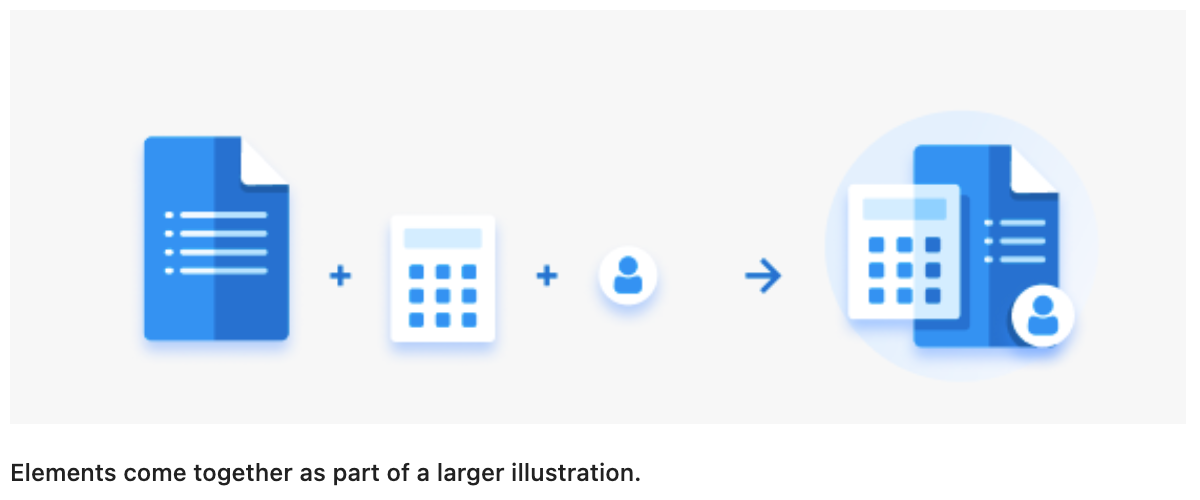
Although most of the illustration should live within the inner circle, some elements may extend beyond it. These should be limited to roughly 10% of the illustration. This can vary by case, but the 10% guideline provides a strong visual rule of thumb.

Shading and highlights
Objects are lit from the upper left to keep lighting consistent across all illustrations. Highlight and shadow placement should be intentional and consistent throughout the system.
Shading is created using subtle, solid blue tints—never gradients, textures, blur, or multiply effects. Opacity may be used sparingly to suggest reflections when needed.
Two highlight styles are used:
Curved, organic highlights for rounded elements
Sharp, graphic highlights for flatter or more geometric elements (such as paper), often appearing as a lighter “cut” across the surface
Both styles can also be used to suggest reflections.

Line
All illustrations use smooth, texture-free lines. Smaller objects tend to use straighter lines, while larger objects allow for more curved and detailed shapes. Intersecting and continuous lines are a defining part of the style, used naturally, not forced, to add elegance and visual interest without distraction. Line weights should remain visually consistent across all illustrations.
Detail
Illustrations include just enough detail to be clear without becoming noisy. They aim for realism through simplicity, using the minimum detail needed to communicate the idea. A range of blue shades adds depth and dimension without overwhelming the design.
Variety
Two illustration “weights” are used. Color distinguishes between subtle and bold styles: lighter-colored illustrations support zero states, error pages, and low-emphasis moments, while richer, darker versions are used for active or high-visibility states.

Where Illustrations Live
Illustrations are used intentionally. Some placements always include illustrations, while others use them only when they add value or clarity to the experience.
Empty States: Empty-state illustrations appear the first time a user enters a new area before any action has been taken. They introduce what’s possible in that space and set expectations for what comes next.
Onboarding: Illustrations support onboarding tasks by explaining what each step is for. As tasks are completed, the illustration style changes to reinforce progress and completion.
Announcement & Error Pages: Illustrations act as supportive elements alongside text, helping communicate access levels, errors, issues, or important updates. They should never carry the full meaning alone, and if removed, the message must still be clear through text.
Spot Illustrations: In rare cases, unique spot illustrations are used to draw attention to something important on a busy page or to help explain a technical concept, always in support of the written content.
Accessibility
Include text alternatives: Any non-text content (images, animations, graphs, etc.) should have a text-based alternative.
Use alt and title attributes: Apply
altandtitleattributes to images and graphical elements.Support SVG accessibility: Use
<title>and<desc>elements inside SVGs.Add nearby descriptions: Include descriptive text near images when additional context is needed.
Outcomes
Adopted across multiple product areas, including fishersci.com, thermofisher.com, and several scientific applications.
Used in onboarding flows, empty states, and error states.
Became the default illustration standard.
Integrated into the Komodo design system with documentation for creating and using illustrations.
Learnings
Designing illustrations as a system—not as one-off assets—makes them easier to scale, maintain, and use consistently across teams.
Close collaboration with brand partners is essential to balance creativity with brand integrity.
Accessibility must be considered even in visual craft work, not just in UI components.
Clear principles and documentation are just as important as the visuals themselves.
Constraints often lead to stronger, more focused creative outcomes.
Conclusion
This project unified scattered illustration styles into a cohesive, scalable system aligned with UX needs and accessibility. Fragmented visuals were replaced with a flexible, well-documented framework that could scale across products and teams.
Beyond visual consistency, the biggest impact was clarity; for users navigating the experience and for teams creating it. Designers no longer had to guess what “on brand” meant, and illustrations became tools for guidance rather than decoration.
The work strengthened my approach to system thinking, collaboration with brand partners, and designing with accessibility in mind from the start. More than visual polish, it showed how thoughtful systems design makes creative work easier to use, easier to maintain, and more impactful.